
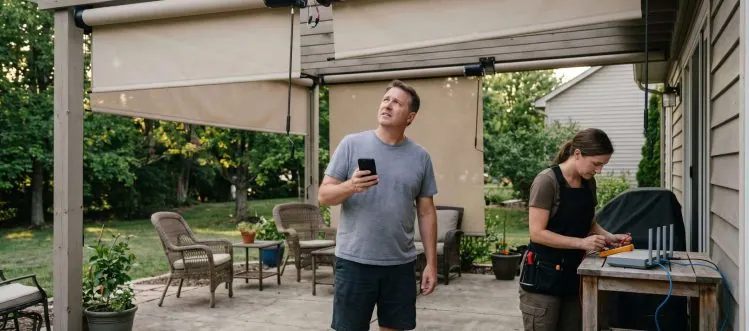
Voice control fails when your WiFi router placement interferes with shade motor signals. Professional setup prevents 90% of connectivity issues.
You ask Alexa to lower the patio shades, wait ten seconds, then walk outside to find them stuck halfway down. Voice control for motorized patio shades promises seamless outdoor living, but most installations create more frustration than convenience. The problem isn't the technology itself, it's how the pieces connect together.
The difference between voice commands that work instantly and those that leave you manually cranking shades lies in understanding signal paths, motor response times, and smart home integration. This guide reveals why most voice setups fail and shows you exactly how to configure Alexa, Google Assistant, and smart hubs for reliable outdoor shade control that responds every time you speak.
Key Takeaways
- Router Placement: WiFi signal strength to outdoor motors determines voice command reliability more than the voice assistant platform you choose.
- Motor Quality: Premium motors respond to voice commands within 2-3 seconds while budget options create 8-15 second delays that feel broken.
- Platform Choice: Google Assistant handles shade groups and scenes better than Alexa, but both require proper hub configuration for outdoor reliability.
- Safety Override: Wind sensors automatically override voice commands above set thresholds, protecting your investment from weather damage during storms.
- Professional Setup: Expert installation costs 20-30% more but prevents signal interference, motor conflicts, and the three most common voice control failures.
Why Voice Integration Fails When Your WiFi Router Is in the Wrong Location
Your voice assistant hears the command perfectly, but the patio shades don't budge because the signal never reaches the motors. Most homeowners place their WiFi router in a central indoor location, creating a dead zone exactly where motorized shades need connectivity. Outdoor motors require consistent signal strength to maintain the wireless bridge between your voice command and the actual shade movement.
The path from 'Alexa, close the patio' to actual shade movement involves multiple signal hops that most people never consider. Your voice travels to Amazon's cloud, back to your smart hub, then wirelessly to each individual shade motor. When any link in this chain weakens, you get partial responses, delayed reactions, or complete silence from your shades.
Here's how different router placements affect voice control reliability for outdoor motorized shades:
| Router Location | Signal Strength | Voice Response Time | Reliability Rating |
|---|---|---|---|
| Central Indoor | Weak | 8-15 seconds | 60-70% |
| Near Patio Door | Good | 4-6 seconds | 85-90% |
| Outdoor Access Point | Excellent | 2-3 seconds | 95-98% |
| Mesh Network | Variable | 3-8 seconds | 80-85% |
Signal Requirements
- Line of Sight: Outdoor motors need clear wireless paths without thick walls, metal siding, or dense landscaping blocking signal transmission.
- Distance Limits: Most shade motors work reliably within 100-150 feet of the hub, but obstacles can cut this range in half.
- Interference Sources: Baby monitors, garage door openers, and neighbor networks on the same frequency create command delays and failures.
- Weather Impact: Heavy rain and high humidity can temporarily weaken wireless signals, making voice commands less responsive during storms.
- Motor Clustering: Multiple shades in the same area can overwhelm a single wireless channel, requiring careful frequency management for group commands.
The solution involves strategic router placement or dedicated outdoor wireless access points positioned specifically for shade motor coverage. Professional installers use signal strength meters to identify optimal hub locations before mounting any hardware. This upfront planning prevents the frustration of voice commands that work sporadically or require multiple attempts to register.
Amazon Alexa vs Google Assistant: Which Actually Controls Shade Groups Better
Google Assistant handles complex shade groupings and multi-zone commands more reliably than Alexa, particularly when you want different shade positions across multiple outdoor areas. While both platforms connect to the same shade motors through smart hubs, Google's natural language processing better interprets commands like 'set the west patio to 50% and close the east side completely.' Alexa tends to struggle with these compound instructions.
The real difference shows up in scene management and scheduling capabilities. Voice control integration works differently depending on whether you use Alexa routines or Google's automation features. Google Assistant maintains more consistent group behavior when controlling 4-6 shades simultaneously, while Alexa sometimes processes group commands as individual shade instructions, creating staggered movement that looks unprofessional.
Platform Comparison
- Group Commands: Google processes 'close all patio shades' as a single instruction while Alexa often sends individual commands to each motor.
- Scene Integration: Google's scene management allows percentage-based positioning across multiple zones with better consistency than Alexa's routine system.
- Voice Recognition: Both platforms handle outdoor ambient noise well, but Google adapts better to wind interference and background sounds.
- Response Speed: Alexa typically responds 1-2 seconds faster to simple commands, but Google handles complex multi-shade instructions more efficiently.
- Hub Compatibility: Both work with major shade hubs, but Somfy TaHoma integration offers more granular control through Google's platform.
Your choice between platforms often comes down to existing smart home ecosystem and command complexity preferences. If you primarily use simple open/close commands for individual shades, Alexa's speed advantage matters more. For households managing multiple outdoor zones with varying shade positions throughout the day, Google's superior group handling and scene management provide better long-term satisfaction.
The Voice Command Delay That Reveals Poor Motor Quality
Premium shade motors respond to voice commands within 2-3 seconds, while budget motors create 8-15 second delays that make voice control feel broken. This delay isn't just about speed, it reveals fundamental differences in motor electronics, wireless receiver quality, and internal processing power. When you speak a command and wait more than five seconds for movement, you're experiencing the limitations of low-grade motor components.
The delay happens because cheaper motors use basic wireless receivers that require multiple signal confirmations before activating. Quality motors like those from established manufacturers process the first clean signal immediately and begin movement while confirming the command. This difference becomes obvious when controlling multiple shades, where premium motors move in synchronized groups while budget options stagger their responses unpredictably.
Response Indicators
- Immediate Response: Motors that begin moving within 2-3 seconds indicate quality wireless receivers and proper signal processing capabilities.
- Synchronized Movement: Multiple shades starting simultaneously shows coordinated motor electronics rather than individual processing delays.
- Consistent Timing: Quality motors respond at the same speed regardless of ambient temperature, humidity, or time of day.
- Signal Confirmation: Premium motors provide audio or visual feedback when receiving commands, eliminating guesswork about whether they heard the instruction.
- Recovery Speed: Better motors quickly reconnect after power outages or WiFi interruptions without requiring manual reset procedures.
Motor response time directly impacts your satisfaction with voice control because delays create doubt about whether the system heard your command. This leads to repeated instructions, conflicting signals, and shades that stop mid-travel or reverse direction unexpectedly. Investing in quality motors with fast wireless response eliminates these frustrations and makes voice control feel natural rather than experimental.
How Wind Sensors Override Voice Commands (And When That's Actually Good)
Wind sensors automatically retract motorized shades when gusts exceed preset limits, overriding any voice commands you give during dangerous weather conditions. This safety feature protects your investment from fabric tears, motor damage, and structural stress that high winds create. However, many homeowners don't understand why their voice commands suddenly stop working when the weather changes, leading to confusion about system malfunctions.
The override system works by monitoring real-time wind speed and immediately sending retract commands to all connected motors when thresholds are exceeded. Your voice assistant will acknowledge your command to lower shades, but the wind sensor takes priority and keeps them in the protected position. This hierarchy prevents costly damage, but it requires proper threshold setting to avoid unnecessary retractions during normal weather.
Wind sensor thresholds and their impact on voice control availability:
| Wind Speed (mph) | Sensor Response | Voice Control Status | Typical Weather |
|---|---|---|---|
| 0-15 | Normal Operation | Fully Active | Calm to Light Breeze |
| 16-25 | Monitoring Mode | Active with Alerts | Moderate Wind |
| 26-35 | Auto Retract | Override Active | Strong Wind/Storms |
| 36+ | Locked Position | Commands Blocked | Dangerous Conditions |
Safety Protocols
- Threshold Settings: Most systems trigger at 20-25 mph sustained winds, but coastal or elevated locations may require lower settings for fabric protection.
- Override Priority: Wind sensors always supersede voice commands, smartphone apps, and manual controls when safety limits are exceeded.
- Automatic Recovery: Shades remain retracted until wind speeds drop below threshold for a preset time period, typically 10-15 minutes.
- Visual Indicators: Quality systems provide status notifications through apps or hub displays when wind override is active.
- Manual Bypass: Some advanced systems allow temporary override for emergency situations, but only for limited time periods.
Understanding wind sensor behavior prevents frustration when voice commands seem to fail during weather events. The system is protecting your shades from damage that would cost hundreds or thousands to repair. Proper threshold calibration ensures protection without unnecessary retractions during normal outdoor activities, maintaining the balance between safety and usability.
Voice Control Works Differently on Retractable vs Fixed-Panel Motorized Shades
Retractable motorized shades respond to voice commands with continuous movement until they reach the commanded position, while fixed-panel systems move in preset increments that require different voice syntax. This fundamental difference affects how you phrase commands and what responses you can expect. Retractable systems understand percentage-based instructions like 'set patio shade to 60%' while fixed panels typically respond better to discrete commands like 'tilt louvers open.'
The motor types and control mechanisms create distinct voice interaction patterns that many installers fail to explain properly. Smart outdoor shade integration requires understanding whether your system uses continuous positioning or stepped movement to set up voice commands that actually work. Fixed-panel systems often need scene programming for complex positioning, while retractable shades can respond to real-time adjustment commands.
System Differences
- Movement Patterns: Retractable shades offer infinite positioning while fixed panels move in preset increments, affecting voice command precision.
- Command Syntax: Percentage-based commands work better with retractable systems while fixed panels respond to tilt and position terminology.
- Response Time: Fixed panels complete positioning faster due to limited movement range, while retractable shades take longer for full extension.
- Scene Complexity: Retractable systems allow gradual adjustment through voice, while fixed panels benefit from programmed scenes for optimal positioning.
- Weather Adaptation: Retractable shades can partially deploy during variable conditions, while fixed panels typically operate in full open or closed positions.
Matching your voice commands to your shade system type eliminates confusion and improves response reliability. Retractable systems offer more flexibility for voice-controlled adjustments throughout the day, while fixed panels provide faster, more definitive positioning for specific outdoor activities. Understanding these differences helps you choose the right system for your voice control preferences and outdoor lifestyle.
The Smart Home Hub Decision That Makes or Breaks Voice Reliability
Your choice of smart home hub determines whether voice commands reach your motorized shades reliably or create ongoing connectivity frustrations. Basic hubs that come with voice assistants work for simple indoor devices but lack the signal strength and protocol support needed for outdoor shade motors. Professional-grade hubs like Somfy TaHoma or Control4 provide dedicated wireless channels and stronger outdoor range that prevent the dropouts and delays common with consumer-level equipment.
The hub acts as the translator between your voice assistant's commands and the specific wireless protocols your shade motors understand. Many motors use proprietary radio frequencies that require specialized hub hardware to communicate effectively. Consumer hubs often struggle with the power requirements and signal processing needed for reliable outdoor motor control, especially when managing multiple shades simultaneously.
Hub Selection
- Signal Strength: Professional hubs provide 2-3 times the wireless range of consumer models, crucial for outdoor motor reliability.
- Protocol Support: Dedicated shade hubs speak the native language of motor electronics while generic hubs require translation layers that introduce delays.
- Device Capacity: Quality hubs handle 20-50 motorized devices without performance degradation while basic hubs struggle beyond 10-15 connections.
- Outdoor Rating: Weather-resistant hubs maintain performance in temperature extremes and humidity that disable indoor-rated consumer equipment.
- Professional Monitoring: Advanced hubs provide diagnostic information and remote troubleshooting capabilities that prevent service calls.
Investing in a quality hub designed specifically for motorized shades eliminates most voice control problems before they start. The upfront cost difference pays for itself through reliable operation and reduced service calls. Generic smart home hubs might work initially, but they typically create ongoing frustrations that make voice control feel unreliable rather than convenient.
Why Professional Voice Setup Costs More Than DIY But Prevents These 3 Problems
Professional voice control setup costs 20-30% more than DIY installation but prevents signal interference, motor conflicts, and integration failures that plague self-installed systems. The additional cost covers specialized tools for signal analysis, proper hub placement, and configuration expertise that eliminates the three most common problems: inconsistent response times, partial group commands, and weather-related dropouts.
DIY installations typically focus on getting basic connectivity working without optimizing for long-term reliability or complex command scenarios. Professional installers use spectrum analyzers to identify wireless interference, configure motor addressing to prevent conflicts, and set up redundant communication paths that maintain voice control during network issues. These steps prevent problems that often don't surface until weeks or months after installation.
Professional Advantages
- Signal Analysis: Installers use professional tools to identify and eliminate wireless interference that causes voice command failures.
- Motor Addressing: Proper device configuration prevents motors from responding to commands meant for other shades in group scenarios.
- Integration Testing: Professionals verify voice commands work reliably across all weather conditions and network scenarios before completing installation.
- Redundancy Planning: Expert setup includes backup communication paths and failsafe procedures that maintain control during system updates or outages.
- Ongoing Support: Professional installations include troubleshooting and optimization services that DIY setups can't provide when problems develop.
The three problems professional setup prevents, signal interference causing delayed responses, motor conflicts creating partial group commands, and weather sensitivity disrupting voice control, typically cost more to fix after installation than the original professional setup fee. Quality installation ensures your voice control investment works reliably from day one and continues performing consistently over years of outdoor use.
Building Reliable Voice Control Systems
Voice control for motorized patio shades transforms outdoor living when properly configured, but it becomes a source of frustration when signal paths, motor quality, and hub selection are overlooked. The difference between systems that respond instantly and those that require multiple attempts lies in understanding how WiFi placement, platform capabilities, and professional setup prevent the common failures that plague DIY installations.
Success with voice-controlled patio shades requires matching your expectations to system capabilities while investing in quality components that deliver consistent performance. Whether you choose Alexa or Google Assistant matters less than ensuring strong wireless signals, quality motors, and proper hub configuration that supports reliable outdoor operation. If you're ready to explore voice control options for your patio, we can help you design a system that responds every time you speak.
Author
Lane Frazier is the owner of Treaty Oak Shade Company with two decades of experience installing voice-controlled motorized shade systems across Central Texas. His hands-on work with hundreds of outdoor installations has revealed the specific configuration challenges and solutions that determine whether voice control actually works reliably in real-world conditions. Lane's practical approach focuses on preventing the common integration problems that turn promising technology into ongoing frustration.
Ready For a Quote?
Get your custom shade quote Today.
Free, no-pressure consultation. We measure, photograph, and send a written line-item proposal within a week. Most installs ship in 3–5 weeks.
Call the workshop
(512) 939-3446
Mon–Fri · 8a–5p CT · Austin, TX
Prefer to talk it through? Calls are answered by the same team that builds your quote — no call centers, no gatekeepers.
Custom exterior shades, motorized patio screens, awnings, and interior window treatments for Austin and Central Texas.
How To Contact Us
Austin, TX 78734
Monday - Friday 8 AM - 5 PM
navigate
Copyright © 2026 | Treaty Oak Shade Co. All Rights Reserved. | Privacy Policy