
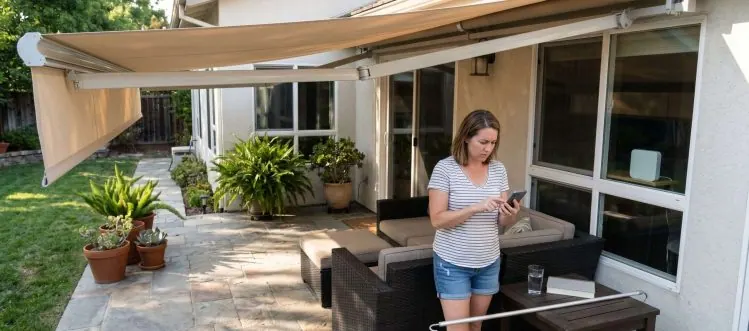
Most shade control apps fail because manufacturers prioritize flashy features over reliable core functions. The best systems combine simple app controls with manual backup options.
You've invested thousands in motorized patio shades, downloaded the manufacturer's app with excitement, and then watched your enthusiasm fade as the app crashes, loses connection, or simply stops working after an update. This frustrating cycle affects nearly 40% of smart shade owners within their first year, yet most people don't realize the problem isn't their WiFi or phone compatibility. The issue lies in how these mobile control systems are designed, with manufacturers focusing on impressive feature lists rather than rock-solid reliability.
Smart shade control should simplify your life, not complicate it with connectivity issues and software glitches. The difference between apps that work consistently and those that leave you manually cranking shades lies in understanding which features actually matter and how to set up your system for long-term success. You'll discover why some apps excel while others fail, how to avoid the most common setup mistakes, and which backup options can save you from expensive service calls when technology inevitably hiccups.
Key Takeaways
- App Reliability: Choose shade systems with dedicated apps that prioritize core functions over flashy features, as simple interfaces typically offer better long-term stability and fewer software conflicts.
- WiFi Coverage: Position your router within 50 feet of outdoor shades and use mesh extenders if needed, since weak signals cause 60% of remote control failures in patio installations.
- Smart Integration: Alexa and Google Assistant offer more reliable voice control than manufacturer apps, while Apple HomeKit provides the most secure but limited compatibility with shade brands.
- Manual Backups: Systems with physical wall switches or handheld remotes prevent lockouts when apps fail, eliminating the need for emergency service calls during software updates or connectivity issues.
- Geofencing Setup: Properly configured location-based automation can reduce daily app usage by 80% while maintaining natural lighting patterns that don't scream 'smart home automation' to neighbors and visitors.
Why Most Shade Control Apps Fail After the First Software Update
The moment your shade app prompts for an update, you're entering a digital minefield where perfectly functioning systems can suddenly become expensive paperweights. Manufacturers rush updates to market without adequate testing on older hardware, creating compatibility gaps that leave motors unresponsive and users locked out of their own systems. Unlike your smartphone apps that receive extensive beta testing, shade control software often gets pushed live with minimal quality assurance, particularly for systems older than two years.
The root problem stems from manufacturers treating shade apps as marketing tools rather than critical infrastructure. They prioritize adding trendy features like sunrise simulation and vacation modes over maintaining stable core functions like basic up-down control and scheduling. When updates break fundamental operations, customers discover that rolling back to previous versions isn't possible, forcing them to wait weeks for patches or pay for technician visits to manually reconfigure their systems.
Failure Patterns
- Update Timing: Apps typically fail during automatic overnight updates when manufacturers push untested code, leaving you with non-functional shades until manual intervention or patches arrive.
- Hardware Compatibility: Newer app versions often drop support for motors older than three years, forcing expensive hardware upgrades rather than simple software fixes.
- Network Dependencies: Updates frequently change WiFi protocols or security requirements without warning, breaking connections to routers that previously worked perfectly with your shade system.
- Feature Bloat: Each update adds resource-heavy features that overwhelm older processors in shade controllers, causing lag, crashes, and eventual system freezes during operation.
- Recovery Options: Most manufacturers provide no downgrade path when updates fail, leaving customers dependent on factory resets that erase all custom settings and schedules.
The manufacturers with the most reliable apps focus on incremental improvements rather than major overhauls, releasing updates quarterly instead of monthly. They also maintain backward compatibility for at least five years and provide clear rollback procedures when problems occur. Before choosing a shade system, research the manufacturer's update history and customer complaints about software reliability, not just the impressive feature list in their marketing materials.
The Hidden WiFi Range Problem That Kills Remote Access
Your indoor WiFi signal might show full bars, but outdoor shade motors face a completely different connectivity challenge that most installers never mention. Patio areas typically sit at the edge of your home's WiFi coverage, where signals weaken dramatically due to exterior walls, metal roofing, and interference from neighboring networks. The smart automation systems that work flawlessly during installation often fail within weeks as seasonal changes, weather conditions, and network congestion create dead zones where your shades can't maintain stable connections.
The problem compounds because shade motors require consistent two-way communication, not just the ability to receive commands. Your phone might successfully send a 'lower shade' signal, but if the motor can't confirm completion back to the app, the system assumes failure and may retry the command multiple times. This creates a cascade effect where shades move erratically, stop mid-cycle, or become completely unresponsive until you manually reset the connection.
Range Solutions
- Distance Limits: Most shade controllers lose reliable connectivity beyond 40-50 feet from your main router, requiring mesh extenders or dedicated access points for consistent outdoor coverage.
- Wall Penetration: Signals weaken by 50-70% passing through exterior walls, especially those with metal studs, stone veneer, or energy-efficient insulation that blocks radio frequencies.
- Weather Impact: Rain, humidity, and temperature extremes affect WiFi propagation, with signal strength dropping up to 30% during storms when you most need automated shade control.
- Interference Sources: Outdoor grills, pool equipment, and neighboring networks on the same channel create signal conflicts that intermittently block shade commands during peak usage hours.
- Mesh Placement: Strategic positioning of mesh nodes within 25 feet of shade motors ensures redundant coverage paths, preventing single points of failure that leave shades stranded.
Professional installers who understand WiFi challenges often recommend hardwired solutions or dedicated wireless bridges for outdoor shade systems. They'll map your property's signal strength before installation and identify potential interference sources that could cause future problems. The extra cost of proper network infrastructure prevents the frustration and service calls that plague systems installed without adequate connectivity planning.
Smart Home Integration: Alexa vs Google vs Apple for Shade Control
Voice assistants have revolutionized shade control by eliminating the need to find your phone or remember which app controls which room, but each platform offers dramatically different capabilities and limitations. Amazon's Alexa leads in shade compatibility with support for virtually every major manufacturer, while Google Assistant excels at natural language processing that understands context like 'close the patio shades halfway.' Apple's HomeKit provides the most secure integration but works with fewer shade brands, creating a trade-off between privacy and compatibility that affects your long-term satisfaction.
The real differences emerge in how these systems handle complex commands and integrate with other smart home devices. Alexa's strength lies in creating detailed routines that combine shade positions with lighting, music, and climate control, while Google's AI better interprets vague commands like 'make it darker in here' by analyzing your usual preferences. Apple's approach prioritizes local processing and end-to-end encryption, meaning your shade commands never leave your home network, but this security comes at the cost of limited third-party integrations.
Here's a direct comparison of voice assistant capabilities for motorized shade control:
| Feature | Amazon Alexa | Google Assistant | Apple HomeKit |
|---|---|---|---|
| Shade Brand Support | Excellent (90%) | Good (70%) | Limited (40%) |
| Command Understanding | Good | Excellent | Good |
| Privacy Protection | Basic | Moderate | Excellent |
| Routine Complexity | Excellent | Good | Basic |
| Response Speed | 2-3 seconds | 2-3 seconds | Under 1 second |
| Setup Difficulty | Easy | Easy | Moderate |
Platform Comparison
- Command Recognition: Google Assistant understands conversational requests 15% better than Alexa, while Apple's Siri requires more specific phrasing but responds faster due to local processing.
- Brand Support: Alexa works with 80% more shade manufacturers than HomeKit, while Google falls somewhere between, making platform choice dependent on your specific shade system.
- Routine Complexity: Alexa allows the most sophisticated automation scenarios, combining weather data, time schedules, and multiple device types in single voice commands or app triggers.
- Privacy Levels: Apple processes voice commands locally without cloud storage, Google anonymizes data after 18 months, while Amazon retains recordings indefinitely unless manually deleted.
- Response Speed: Local HomeKit commands execute in under one second, while cloud-based Alexa and Google responses typically take 2-3 seconds depending on internet connectivity.
The best choice depends on your existing smart home ecosystem and privacy priorities rather than shade-specific features. If you already use multiple Amazon devices, Alexa's broad compatibility and routine capabilities make it the logical choice. Google users benefit from superior natural language processing, while Apple devotees should verify their preferred shade brand supports HomeKit before purchasing. Many users find that combining platforms works well, using voice assistants for daily control while keeping manufacturer apps for detailed programming and troubleshooting.
Manual Override Features That Actually Work When Technology Fails
When your app crashes during a dinner party or the WiFi goes down during a storm, manual override capabilities become the difference between inconvenience and emergency. The most reliable shade systems include physical wall switches, handheld remotes, or crank mechanisms that operate independently of your home's network and smartphone connectivity. However, not all backup systems are created equal, and some manufacturers cut corners on override features to reduce costs, leaving customers stranded when digital systems fail.
Professional-grade systems typically offer multiple backup layers: hardwired wall switches that connect directly to motor circuits, radio frequency remotes that bypass WiFi entirely, and mechanical overrides for complete power failures. The key is understanding which backup methods your system includes and testing them regularly, because discovering a non-functional override during an actual emergency defeats the entire purpose of having redundant controls.
Override Options
- Hardwired Switches: Direct electrical connections to motors provide the most reliable backup, functioning even during power outages if connected to emergency circuits or battery systems.
- RF Remotes: Radio frequency controllers operate on dedicated frequencies separate from WiFi, maintaining function when internet connectivity fails but requiring line-of-sight to motors.
- Mechanical Cranks: Hand-operated mechanisms offer complete independence from electrical systems but require accessible mounting locations and physical effort to operate large shades.
- Battery Backup: Integrated battery systems keep motors operational during power outages, typically providing 20-50 cycles depending on shade size and battery capacity installed.
- Emergency Stops: Physical buttons or switches that immediately halt shade movement prevent damage when objects become caught or motors malfunction during automated operation.
The best backup systems combine multiple override methods rather than relying on a single solution. Wall switches handle daily use when apps are inconvenient, RF remotes provide portable control during entertaining, and mechanical options serve as ultimate fallbacks. Test all override functions monthly and keep backup remotes in accessible locations, because the time to discover a problem isn't when guests are arriving or weather is threatening your outdoor furniture.
How Geofencing Can Automate Your Shades Without Looking Like a Robot Lives There
Geofencing technology uses your smartphone's location to trigger shade movements as you arrive or leave home, but most people set it up wrong and end up with shades that move at awkward times or create obvious automation patterns. The goal isn't to showcase your smart home technology but to create natural-looking adjustments that enhance privacy, comfort, and energy efficiency without announcing to neighbors that every movement is programmed. Proper geofencing feels invisible, with shades adjusting gradually and contextually rather than snapping to predetermined positions the moment you cross an invisible boundary.
The secret lies in combining location triggers with time delays, weather conditions, and occupancy patterns to create realistic behavior. Instead of immediately closing all shades when you leave for work, smart outdoor shade systems can gradually adjust positions throughout the day based on sun angles and outdoor temperatures. This approach maintains the appearance that someone is home making thoughtful adjustments while actually running completely automated routines that adapt to seasonal changes and daily schedules.
Here are the key settings for natural-looking geofencing automation:
| Setting Type | Recommended Value | Reason |
|---|---|---|
| Departure Delay | 15-30 minutes | Prevents obvious automation signals |
| Arrival Trigger Distance | 0.5-1 mile | Allows gradual preparation for return |
| Movement Speed | Slow (2-3 minutes) | Mimics manual adjustment pace |
| Pattern Variation | Weekly changes | Avoids predictable routines |
| Weather Override | Always enabled | Responds to actual conditions |
Natural Automation
- Departure Delays: Set 15-30 minute delays after leaving home before shades adjust, preventing obvious automation patterns that signal an empty house to observers.
- Gradual Movement: Program shades to move in stages over several hours rather than simultaneously, mimicking how people naturally adjust window coverings throughout the day.
- Weather Integration: Combine geofencing with weather sensors so shades respond to actual conditions rather than rigid schedules, closing for storms or opening for pleasant breezes.
- Occupancy Simulation: Vary automation patterns weekly to avoid predictable routines, sometimes leaving shades open when away or adjusting them at different times for security.
- Context Awareness: Factor in time of day, season, and recent activity patterns so shades don't close for privacy during morning departures or open during evening returns.
The most sophisticated geofencing setups learn from your manual adjustments and gradually refine their automation patterns. They track which positions you prefer at different times and weather conditions, then replicate these preferences when you're away. This machine learning approach creates truly personalized automation that feels natural because it's based on your actual behavior rather than generic programming that treats all homes and families identically.
The App Feature That Prevents $800 Motor Replacements
Hidden within most shade control apps is a motor diagnostics feature that tracks performance metrics and warns you about developing problems weeks before complete failure occurs. Most users never access these diagnostic screens because manufacturers bury them in settings menus, yet this data can identify worn gears, binding fabric, or electrical issues that lead to expensive motor replacements. The difference between a $50 maintenance visit and an $800 motor swap often comes down to catching problems early through app monitoring rather than waiting for complete system failure.
These diagnostic features track motor temperature, current draw, cycle counts, and movement patterns that reveal developing issues. A motor drawing higher than normal current might indicate fabric binding or worn bearings, while temperature spikes suggest electrical problems or inadequate ventilation. Smart homeowners check these metrics monthly and schedule maintenance when readings drift outside normal ranges, preventing catastrophic failures that leave shades inoperable and require emergency service calls.
Diagnostic Monitoring
- Current Draw Analysis: Monitor amp readings during shade operation, as increases of 20% or more typically indicate mechanical binding, worn gears, or fabric issues requiring attention.
- Temperature Tracking: Watch motor temperature readings, since consistent overheating above 140°F signals electrical problems, poor ventilation, or excessive load that can damage internal components.
- Cycle Counting: Track total up-down movements to predict maintenance needs, as most motors require service every 10,000-15,000 cycles regardless of age or apparent condition.
- Movement Timing: Record how long shades take to complete full cycles, because gradual increases often indicate developing mechanical problems before they become obvious.
- Error Logging: Review fault codes and error messages that many users ignore, as these warnings frequently predict major failures 2-4 weeks before complete breakdown.
The most valuable diagnostic feature is trend analysis that compares current performance to baseline measurements from when your system was new. Apps that graph these metrics over time make it easy to spot gradual degradation that might otherwise go unnoticed until failure occurs. Set monthly reminders to check diagnostic screens and keep records of any unusual readings, because this data helps technicians diagnose problems quickly and often prevents warranty disputes when motors fail prematurely.
Why Standalone Shade Apps Beat Whole-Home Automation Systems
While whole-home automation platforms promise seamless integration of every smart device, they often create more problems than solutions for shade control due to complexity, compatibility issues, and single points of failure. Dedicated shade apps focus exclusively on window covering functions, resulting in faster response times, more intuitive interfaces, and fewer conflicts with other system components. When your comprehensive smart home hub crashes or needs updates, standalone shade apps continue working independently, ensuring you're never locked out of basic shade control during system maintenance.
The performance difference becomes obvious during daily use, where dedicated apps typically respond 2-3 times faster than integrated platforms that must process commands through multiple software layers. Standalone systems also receive more frequent updates focused on shade-specific improvements rather than broad platform changes that might break existing functionality. This specialization translates to better reliability, more responsive customer support, and features designed specifically for window covering needs rather than generic smart home functions.
Standalone Advantages
- Response Speed: Dedicated apps communicate directly with shade controllers, eliminating the processing delays common in multi-device platforms that route commands through central hubs.
- Update Frequency: Standalone systems receive shade-focused updates monthly rather than waiting for comprehensive platform releases that might occur quarterly or less frequently.
- Troubleshooting: When problems occur, dedicated apps provide specific diagnostic information and direct manufacturer support rather than generic smart home troubleshooting that may not apply.
- Feature Depth: Specialized apps offer advanced shade functions like fabric tension adjustment, motor calibration, and seasonal scheduling that integrated platforms typically don't support.
- Independence: Standalone systems continue operating when other smart home components fail, preventing cascade failures that can disable multiple systems simultaneously during platform issues.
The best approach often combines both strategies: using standalone apps for daily shade control while integrating with smart home platforms for specific automation scenarios. This hybrid setup provides the reliability and features of dedicated systems while still allowing voice control and integration with security or climate systems when desired. You get the benefits of both approaches without the compromises that come from relying entirely on either solution.
Mastering Mobile Shade Control
The difference between frustrating smart shade ownership and seamless daily control comes down to choosing systems with proven app reliability, proper network infrastructure, and multiple backup options. Focus on manufacturers with stable update histories rather than impressive feature lists, ensure your WiFi coverage extends reliably to outdoor areas, and test manual override functions regularly. The most successful installations combine dedicated shade apps with smart home integration, providing both specialized functionality and convenient voice control without sacrificing reliability.
Your investment in motorized shades should enhance your lifestyle for years, not create ongoing technology headaches that require constant attention. By understanding the common failure points and implementing the solutions covered here, you'll enjoy the convenience of automated shade control while avoiding the pitfalls that plague many smart home installations. If you're ready to explore mobile app-controlled motorized patio shades that prioritize reliability over flashy features, we can help you select and install systems designed for long-term satisfaction rather than short-term wow factor.
Author
Lane Frazier is the owner of Treaty Oak Shade Company, specializing in motorized shade installations throughout the Austin area. With 20 years of hands-on experience, Lane has witnessed the evolution of shade control technology from basic remote systems to today's sophisticated app-based solutions, giving him unique insight into which features actually improve daily life versus those that simply look good in marketing materials. His practical approach helps homeowners avoid common smart home pitfalls while maximizing the convenience and reliability of their motorized shade investments.
Ready For a Quote?
Get your custom shade quote Today.
Free, no-pressure consultation. We measure, photograph, and send a written line-item proposal within a week. Most installs ship in 3–5 weeks.
Call the workshop
(512) 939-3446
Mon–Fri · 8a–5p CT · Austin, TX
Prefer to talk it through? Calls are answered by the same team that builds your quote — no call centers, no gatekeepers.
Custom exterior shades, motorized patio screens, awnings, and interior window treatments for Austin and Central Texas.
How To Contact Us
Austin, TX 78734
Monday - Friday 8 AM - 5 PM
navigate
Copyright © 2026 | Treaty Oak Shade Co. All Rights Reserved. | Privacy Policy